A list of attractions is not yet a daily itinerary. Each stop consumes time, each transfer consumes time and meals and breaks consume time even when they are not written on the map. The itinerary pace tool adds those categories and a percentage buffer against your available hours. This guide builds a day that can be reviewed numerically while acknowledging that real opening hours, queues and traffic must be checked separately.
Define the actual usable window
Start with the time you can leave your accommodation and the time you need to finish, accounting for booked commitments. Do not automatically use every waking hour as sightseeing capacity. If a fixed meeting interrupts the middle of the day, the single-window model may be too simple; calculate the morning and afternoon separately. The tool accepts up to twenty-four available hours but does not decide whether the chosen window is comfortable or sensible. A realistic window is an input you choose from the travel day's constraints.
Count transfers explicitly
A day with four stops may have more than three travel legs if you include the journey from accommodation and the return. Count the legs represented by your plan and enter an average time based on the actual route information you have. If the legs vary greatly, sum them separately and use a documented equivalent average, or run separate scenarios. Straight-line distance does not provide these transfer times. Include walking inside large stations or complexes where relevant, because reaching the map pin is not always the same as reaching the entrance.
For the next input check, use Itinerary Pace Calculator. Its result should retain the assumptions described here.
Protect meals and ordinary pauses
Use the meal-and-break field for the time you intend to spend eating, resting or resetting between activities. This is separate from the visit time at attractions. If a food market is itself a planned stop, avoid counting the same meal duration in both fields. The tool cannot know which activities overlap. A clear category ledger helps: visits, travel, breaks and buffer. Planning a pause is not wasted itinerary capacity; it is a way to keep the day usable rather than making every small delay feel like a failure.
Read over-capacity results as an editing prompt
When total planned minutes exceed the available window, remove a stop, shorten a flexible visit, reduce travel legs by grouping nearby places or extend the window only if the actual constraints permit it. Do not solve the mismatch by entering unrealistic transfer estimates. A positive remaining time also does not prove the schedule works: timed entry and opening hours can still create conflicts. Use the numerical result as the first feasibility check, then put events on a clock and review their ordering. Both the total and the sequence must make sense.
A related planning question is covered in Why a packing checklist disappears after reloading.
Turning the total into a chronological draft
After the day fits numerically, place the first stop, transfer and next stop on a simple clock timeline. Add the meal period where it will actually occur and check any fixed entry time or closing time against that sequence. A plan can fit eight hours in total and still fail if a museum closes before your chosen visit begins. If you move that visit earlier, recheck route legs because the new order can change transfer time. Keep the aggregate calculator as a rapid test for revisions, but retain the timeline as the operational plan. For a flexible day, exact minute-by-minute detail may be unnecessary; broad blocks and fixed anchors can be sufficient. The useful distinction is between total capacity and event placement. Both must work before a list of stops becomes a usable itinerary. If only one works, edit the order or scope rather than reporting the day as validated because the utilization percentage is below one hundred.
Worked example
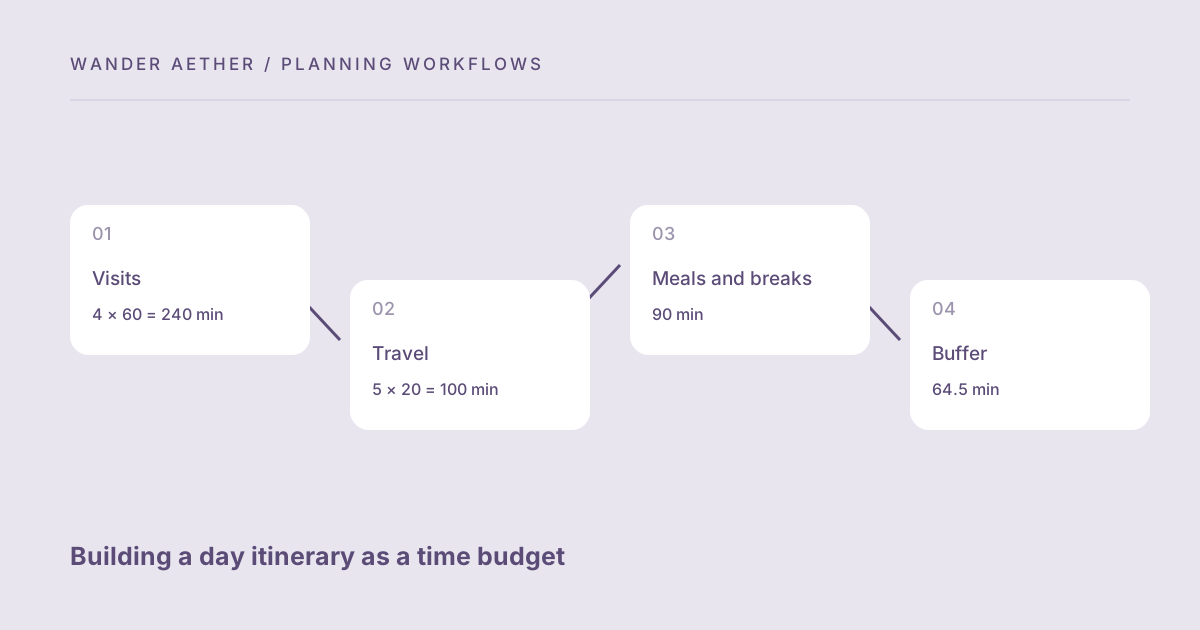
Worked example: A traveler has eight usable hours. Four stops at sixty minutes each require 240 minutes. Five travel legs at twenty minutes require 100, and meals and breaks add 90. Base time is 430 minutes. A 15% buffer adds 64.5, bringing the total to 494.5 minutes, or about 8.24 hours. The day is over capacity by 14.5 minutes before checking opening hours. Removing one flexible sixty-minute stop reduces the base to 370 and the buffered total to 425.5 minutes. That leaves 54.5 minutes, making the revised plan easier to sequence and review.
Reference table
| Item or scenario | Value or choice | What to remember |
|---|---|---|
| Visits | 4 × 60 = 240 min | Time at the stops |
| Travel | 5 × 20 = 100 min | Includes outbound and return |
| Meals and breaks | 90 min | Not hidden inside transfers |
| Buffer | 64.5 min | 15% of 430 base |
| Total | 494.5 min | Exceeds 480-minute window |
Before you finish
- Set the usable window from actual commitments.
- Count outbound, between-stop and return legs as applicable.
- Avoid double-counting meals embedded in a planned stop.
- Edit over-capacity plans with realistic changes.
- Check the sequence against opening and booked times afterward.
Your next step
Save the revised time budget with the route notes used to estimate transfers. The point is not to account for every minute, but to notice a structural mismatch before the trip. A smaller set of well-timed stops can provide a better day than a long list that depends on everything happening unusually fast.
Continue with How much itinerary buffer does a travel day need?. When your plan needs the next calculation, open Travel Time Zone Converter and carry over only the inputs appropriate to that tool.
Repair a day that is 30 minutes too full
An eight-hour window supplies 480 minutes. The estimates below include transfers and recovery time as separate costs, so reducing a visit does not silently remove the time needed to reach it.
| Category | Original plan | Revised plan |
|---|---|---|
| Activities | 240 minutes | 180 minutes: remove one 60-minute visit |
| Transfers | 90 minutes | 90 minutes |
| Meals and breaks | 90 minutes | 90 minutes |
| Buffer | 90 minutes | 90 minutes |
| Total against 480 minutes | 510: over by 30 | 450: 30 minutes unallocated |
Make your own decision record
Date / place / local zone: ___
Usable start and end: ___
Available minutes: ___
Visits: ___
Transfers: ___
Meals / breaks: ___
Buffer: ___
Required total: ___
Available minus required: ___
Fixed bookings and opening hours checked individually: ___
First optional stop to remove: ___
Download example and blank worksheet (.txt)
A plain-text file you can edit or print. No account or upload is needed.